
AI’s flipped how people create and work with digital images. Producing anything detailed used to take specialized design software, technical skills, real time. Now AI-powered image tools take written descriptions and turn them into visual concepts in moments. Content creators, marketers, students, educators, designers, everyday people just messing around — genuinely useful for all of them.
An AI image generator uses machine learning models to interpret text instructions and produce an image based on those instructions. Understanding how these systems actually work gets you more predictable, more useful results.
Table of Contents
What Is an AI Image Generator?
Software creating or modifying images through AI. Trained on very large collections of visual and textual information.
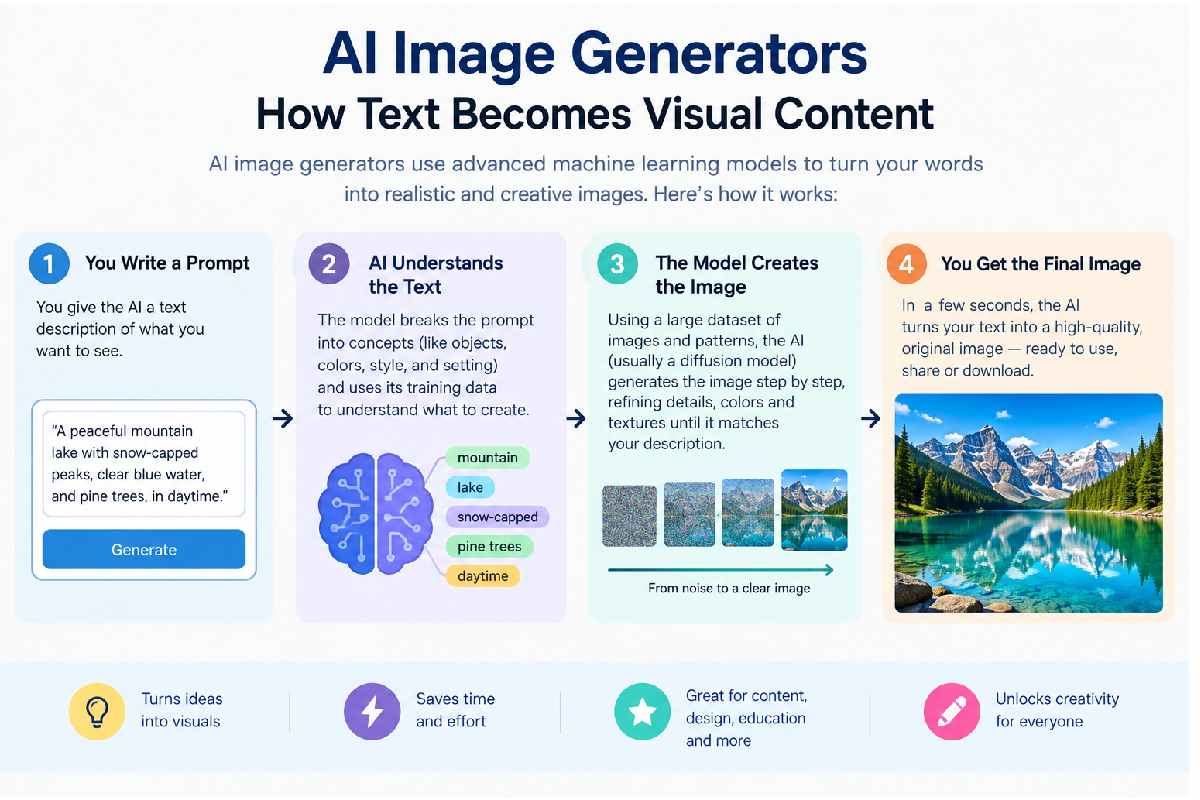
You write a prompt describing what you want. Peaceful mountain landscape at sunrise, futuristic city street, minimalist product illustration — whatever. System reads the words, generates an image trying to match.
Some tools work with reference images too. Guide the appearance, the composition, the style, using an existing picture as the starting point.
How Does AI Image Generation Work?
Complex underneath, sure, but breaks into a few stages easy enough to follow.
First — the system reads your prompt. Pulls out important concepts, objects, environments, colors, visual styles, positions, how elements relate to each other.
Then the model leans on patterns learned during training, figures out what the requested visual might actually look like. Depending on the tech, might start with visual noise, progressively transform it into something coherent.
Final stage — an image reflecting the instructions. Quality comes down to the model, prompt clarity, image requirements, whatever limits the particular tool’s got.
Why Prompt Writing Matters
How good the image turns out ties heavily to your instructions. Short prompt, works fine sometimes. Useful details, way more for the model to actually work with.
Not “a city” — “a modern city street at sunset, tall glass buildings, pedestrians walking along a wide sidewalk, warm natural lighting, cinematic composition.” Big difference.
Doesn’t guarantee perfection. Gives you clearer direction, though — that’s the whole point.
Subject, setting, lighting, composition, color palette, artistic approach — describe it. Too many unnecessary details, though, and the prompt gets confusing. Effective prompting’s about relevance, not length.
Common Uses of AI-Generated Images
Shows up across a lot of digital content work.
Bloggers and social creators generate visuals for illustrations, posts, thumbnails, creative projects — skip the stock libraries entirely, build exactly what they need.
Designers use it early in creative work. A generated image becomes a starting point — compositions, color combinations, environments, general direction.
Teachers and students create visual examples for presentations and materials. An instructor generates an imagined historical setting, or a simplified conceptual illustration to back up a lesson.
Businesses experiment with campaign concepts, product presentations, social content. Especially useful for brainstorming — multiple ideas explored fast, nobody manually building every single one.
Choosing the Right Image Style
A lot of visual styles available. Something photographic, a digital illustration, watercolor, 3D render, cartoon, poster, minimalist graphic — pick what fits.
Depends on the purpose, really. Professional presentation, clean and realistic works. Children’s educational project, colorful illustration probably fits better.
Worth generating several variations rather than just accepting the first result as final. Comparing them shows which instructions actually get you the visual characteristics you’re after.
Limitations to Consider
Not perfect, for all the capability. Visual inconsistencies show up, especially with complex scenes or a bunch of people in frame.
Text inside images can be unreliable too. Letters, numbers, logos, detailed typography — comes out distorted or wrong sometimes.
Copyright and responsible use matter a lot. Know the terms tied to whatever tool you’re using. Think through whether generated content actually fits commercial or public use. And avoid recreating protected characters, logos, identifiable individuals without authorization — that one’s important.
The Future of AI Image Creation
Likely becoming more integrated into daily creative workflows. Not replacing traditional design methods at all – working with them.Designer brainstorms initial concept with AI, then refines by hand. A writer makes a rough drawing, cuts it for a particular article. AI helps teachers design visual teaching aids and adapt them for classroom use.Real value is not just to generate an image automatically, then. It’s about learning how to clearly communicate visual ideas and how to critically evaluate what comes back.
Conclusion
AI image generation’s made visual experimentation way more accessible — turning written ideas into images without needing advanced design skills. Education, content creation, design, marketing — practical possibilities everywhere you look.
However, be aware of the limitations, check the results carefully and remember copyright and usage requirements. AI generated imagery is really useful when you have thoughtful prompts + human editing. It’s part of a bigger creative process — not a replacement for actual human judgment.